
How to Switch SEO Apps Without “Nuking” Your Hard Work

For many store owners, the idea of switching SEO applications is terrifying. You have likely spent dozens of hours, or paid a freelancer, to manually write alt text for your best-selling products. The fear is rational: You install a new tool, press a button hoping for an improvement, and suddenly your carefully crafted keywords are overwritten by generic, template-based generated text. We understand this anxiety. When you migrate to Semantic: AI Image Alt Tag SEO, we treat your existing data with the same caution a data recovery specialist treats a corrupted hard drive. We do not believe in a “one-size-fits-all” overwrite. Here is the technical breakdown of how to migrate from template-based apps (like AltGenius or YT SEO) to Semantic without losing your existing optimization. The Core Philosophy: Respect Existing Data Most legacy SEO apps operate on simple logic: Is there an Alt Tag? If yes, overwrite it. If no, add one. Semantic operates on Contextual Logic. We analyze the quality of the existing tag before deciding to touch it. This allows you to keep what works and only fix what is broken. We accomplish this through three distinct processing modes. 1. The “Safety First” Protocol: Missing Only Mode Best for: Merchants who have done significant manual SEO work and only want to plug holes. This is your safest migration path. When you run a bulk operation in this mode, our system scans every product image. If an image already has an alt tag—even a bad one—we skip it. We will strictly target images that have zero data. 2. The “Smart” Protocol: Actionable Mode Best for: Merchants transitioning from template apps that left “junk” data behind. This is the standard recommendation for migration. In this mode, we do not just look for empty fields. We scan the content of the existing alt text to determine if it is valuable. We look for “junk” signals often left by lazy file naming or basic bulk tools. If the current tag is identified as “junk” (like IMG_5403.jpg or Untitled), we treat the slot as empty and generate a descriptive, keyword-rich AI tag. If the tag looks like a human wrote it, we leave it alone. 3. The “Fresh Start” Protocol: Optimize All Best for: Stores with completely outdated or irrelevant SEO data. This is the aggressive option. It ignores previous data entirely. It will analyze the image and the product context anew to generate the most accurate tag possible, overwriting whatever is currently there. Step-by-Step Migration Guide Follow this procedure to move your store to Semantic without disrupting your search rankings. Step 1: The Pre-Flight Check Before installing the new app, log into your current SEO tool. Ensure there are no active “auto-sync” or “daily overwrite” tasks scheduled. You want the old app dormant before you begin. Step 2: Installation and Initial Scan Install Semantic: AI Image Alt Tag SEO from the Shopify App Store. Upon launch, the dashboard will perform an index of your current product catalog. Step 3: Select Your Strategy Navigate to the Bulk Optimizer tab. You will be presented with the three modes detailed above. Step 4: Execute and Review Run the process. Once complete, Semantic provides a log of exactly what was changed. You can review specific products to confirm that your manual “heritage” tags were skipped, while the gaps were filled with descriptive, high-quality content. Step 5: Decommission the Old App Once you have confirmed that your high-value tags are safe and your low-value tags have been upgraded, you can safely uninstall your previous SEO application. The Promise We build for stability. We recognize that SEO is a long-term investment. Our goal is to augment your work, not erase it. By using Actionable or Missing Only modes, you ensure that the only changes made to your store are improvements.
Google Has Eyes Now: Why “Keyword Stuffing” Is Killing Your Image Rank
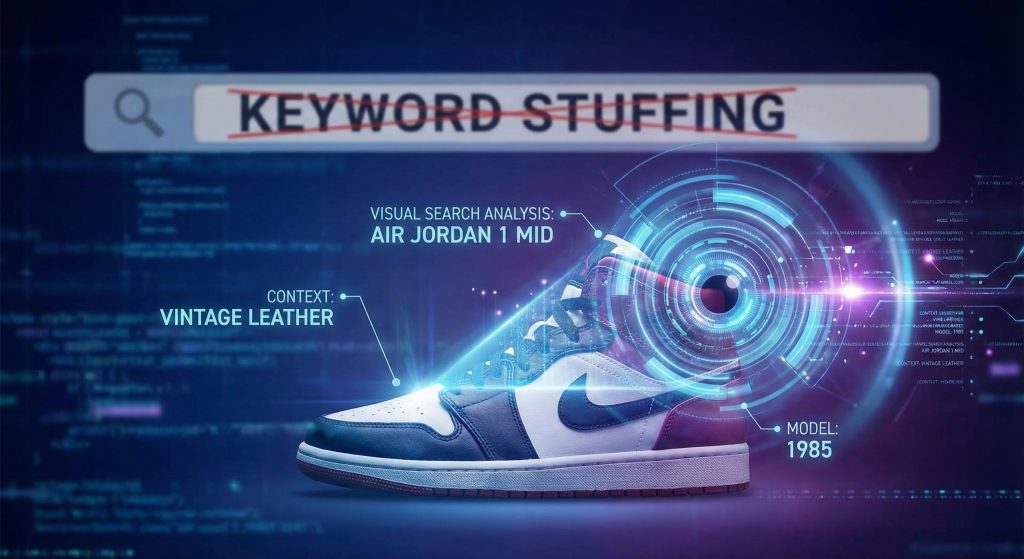
For the last decade, SEO has been a game of text matching. You wrote “running shoes” in your backend, and Google served your page to people typing “running shoes.” It was a simple, transactional relationship. That era is over. With the rapid integration of Google Lens and multi-search algorithms, the search engine is no longer just reading your code. It is looking at your images. And if you are still using 2018 tactics, like stuffing keywords into your Alt Text, you are feeding garbage data to the most sophisticated visual engine on the planet. We analyzed how modern indexing works, and the results are clear: Google doesn’t trust your keywords anymore. It trusts what it sees. The Problem: Most AI Is “Pixel Blind” To understand why your current SEO strategy is failing, you have to understand how basic Computer Vision works. When you use a generic bulk-optimizer app to generate Shopify Alt Text, the AI looks exclusively at the pixels in the image. It doesn’t know your brand. It doesn’t know your inventory. It simply identifies shapes. If you sell a high-end, limited-edition sneaker, a standard AI sees a shape with laces and a rubber sole. The result? This tag is technically accurate, but for SEO, it is useless. It places your premium product in the same bucket as a $20 discount rack sneaker. You aren’t competing for “Vintage Jordans”; you are competing for “Red Shoe.” You will lose that fight every time. The “Semantic Difference”: Context-Aware Engine We identified this flaw early in development. The pixel data alone is never enough to generate high-ranking metadata. To solve this, we built a Context-Aware engine. Unlike basic tools that operate in a vacuum, our system reads your store’s “manual” before it looks at the product. Before the AI writes a single word of Shopify Alt Text, it ingests: It combines this text data with the visual analysis. It bridges the gap between what the product looks like and what the product is. The Comparison: Which Tag Does Google Prefer? Let’s look at the data. Below is a comparison of how a generic competitor tags a product versus how a Context-Aware system tags the same image. Product: A white Nike Air Jordan 1 Mid. The Verdict: The competitor’s tag is generic noise. It tells Google nothing about the brand, the model, or the material. The Semantic tag matches the user intent. When a user searches for “Men’s white leather Jordan 1,” Google matches the query specifically to the image attributes. This is how you capture high-intent traffic from Google Images and Shopping. Feature Highlight: The “Actionable” Mode (Stopping the Nuclear Option) There is a dirty secret in the Shopify App Store. Most SEO apps offer a “Bulk Fix” button. It sounds convenient, but it is often a “Nuclear Option.” When you click “Fix All,” those apps overwrite everything. If you spent hours manually writing perfect descriptions for your best-sellers three years ago, a “Bulk Fix” will wipe them out and replace them with generic AI drivel. We rejected this approach. We developed Smart Bulk with an “Actionable” mode. instead of blindly overwriting your entire catalog, our system scans your current Alt Text first. It scores the quality of existing tags. This allows you to target only the weak links in your SEO chain without destroying the foundation you have already built. Conclusion The days of tricking the algorithm are over. You cannot brute-force your way to the top of search results by stuffing keywords into hidden fields. Google has eyes now. It knows when your text doesn’t match your image. The only way to win is to provide accurate, context-rich descriptions that help the machine understand your inventory. Don’t let dumb AI define your products. Technical Summary Ready to upgrade your visual SEO? [Run a Semantic Audit today].
The Invisible Lawsuit: Why Your “Red Shirt” Alt Text Is a Legal Time Bomb

You built a business to sell products. You didn’t build it to fund a predatory lawyer’s vacation home in the Hamptons. But if you are running a Shopify store right now, you might be doing exactly that. There is a threat lurking in your backend. It isn’t a hacker. It isn’t a supply chain collapse. It is the text hidden behind your product images. Most merchants treat Alt Text as an afterthought. A chore. A place to dump keywords hoping to trick Google into ranking a product page higher. That lazy strategy used to be harmless. Today, it is a liability. Web accessibility lawsuits are hitting record highs. Plaintiffs filed over 4,000 lawsuits against websites in 2023 alone. They aren’t targeting just the massive conglomerates anymore. They are targeting anyone with a checkout button and sloppy code. If your Alt Text says “red shirt cheap best price,” you are painting a target on your back. The Trap: Keyword Stuffing Is Not SEO. It’s Evidence. Let’s look at the old playbook. You upload an image of a dress. You want traffic. So, you write Alt Text that looks like this: “Summer dress floral dress midi dress best women’s clothing store sale.” To a search engine in 2015, that looked like relevance. To a screen reader used by a visually impaired person in 2025, that sounds like a stroke. Screen readers read Alt Text aloud. That is their job. When a blind user navigates to your product, they need to know what the image depicts. They expect to hear: “Woman wearing a floral midi summer dress with short sleeves.” Instead, your keyword-stuffed tag reads them a nonsensical grocery list of search terms. This is the trap. When you stuff keywords, you aren’t just creating a bad user experience. You are failing to provide equivalent access. That is the core requirement of the Americans with Disabilities Act (ADA). By prioritizing a search algorithm over a human user, you demonstrate negligence. Lawyers know this. They use automated scripts to crawl thousands of Shopify stores. These scripts look for missing Alt Text or obvious keyword stuffing. If your site gets flagged, you don’t get a warning. You get a demand letter. Settlements often range from $10,000 to $50,000. That doesn’t include your legal fees to fight it. Google doesn’t care if you lose that money. Lawyers do. The Solution: “Semantic” Is Your Protection Layer You need to stop thinking about Alt Text as a marketing lever. You need to start thinking about it as insurance. The goal isn’t to be clever. The goal is compliance. specifically, WCAG 2.1 compliance. This creates a massive logistical headache. If you have 5,000 SKUs, writing descriptive, legally defensible Alt Text for every image is impossible to do manually. You don’t have the time. You likely don’t have the budget to hire a compliance firm to write them for you. This is where Semantic enters the room. We didn’t build Semantic just to help you rank (though it does that). We built it to keep you out of court. Semantic acts as a firewall between your lazy past habits and your future liability. It uses advanced AI to analyze your images and generate descriptions that satisfy strict accessibility standards. It doesn’t guess. It observes. And it adheres to the rules that judges care about. Feature Highlight: Context Aware (The “Vintage Nike” Factor) Generic AI is dangerous. If you use a basic image recognition tool on a photo of a rare sneaker, the AI might just say: “A shoe on a white background.” Is that accurate? Technically. Is it compliant? Barely. Is it helpful? Absolutely not. If you are selling a 1985 Vintage Nike Air Jordan 1, “A shoe” is an insult to the customer. A blind user deserves to know exactly what is being sold, just as a sighted user does. If the sighted user sees “Air Jordan,” the screen reader must say “Air Jordan.” Semantic is context-aware. It doesn’t just look at the pixels in the image. It reads your Product Title and Description. It combines visual data with your existing catalog data to generate a description that is precise and rich. This distinction matters. WCAG guidelines demand that the text alternative serves the same purpose as the image. If the image sells the premium nature of the fabric, the text must convey that. Semantic bridges the gap between what the camera sees and what the product is. It ensures that your visually impaired customers get the full sales pitch, not a watered-down generic label. Feature Highlight: Fixing the Junk (The “IMG_9923” Problem) Open your media library. Scroll down to your older uploads. What do you see? We all do it. We rush to get a product live. We upload the file straight from the camera or the manufacturer. We tell ourselves we will fix the file name later. We never do. For a screen reader, a file name like IMG_9923.jpg is a dead end. Sometimes, if Alt Text is missing entirely, the screen reader will read the file name aloud to the user. Hearing “Image nine nine two three dot jay peg” tells the user nothing. It screams incompetence. Even worse are the “keyboard smashes”—when a hurried uploader just hits random keys to save a file. jkfdsl.jpg. Semantic hunts these down. Our system identifies these accessibility failures immediately. It recognizes that IMG_9923 is not a descriptor; it is a placeholder. It sees asdf for what it is—garbage data. Semantic treats these “junk” tags as empty gaps. It targets them for immediate remediation. It scans the image, reads the context, and replaces the gibberish with a structured, compliant sentence. You don’t have to audit your library of 10,000 images to find the file name errors. Semantic does the audit for you. It finds the legal cracks in your foundation and fills them with concrete. A Two-for-One Win I promised I was pragmatic. I hate spending money on things that don’t generate a return. Buying a “compliance audit” from
